
Chỉ đường ngay trên đồng hồ Amazfit
Chọn chỗ muốn đến trên điện thoại, hoặc dán link Google Maps, bấm Gửi. Đồng hồ hiện bản đồ, mũi tên rẽ và rung báo trước khi rẽ. Chạy xe không phải cầm điện thoại.
Turn-by-turn directions on your Amazfit watch
Pick a destination on your phone or paste a Google Maps link, then tap Send. Your watch shows the map and turn arrows, and vibrates before every turn. No need to hold your phone while you ride.
Dùng trong 3 bước
Tính năng

Watch-sized, map-clear
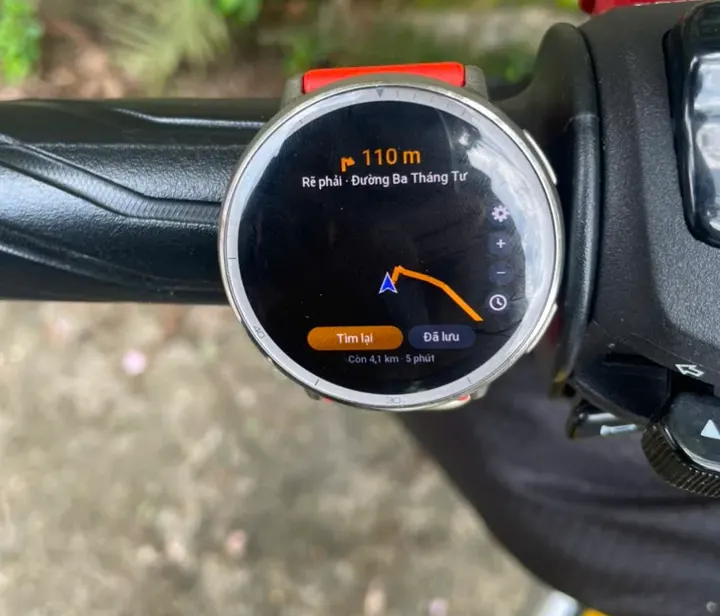
The blue arrow is you, the yellow line is your route, and the next turn is always shown at the top. Want a wider view? Drag, zoom in and out, or switch to a full-screen map.
Routing works worldwide using OpenStreetMap. Road-tested most in Vietnam, on many motorbike routes around Da Lat and in Ho Chi Minh City.
Gọn như đồng hồ, rõ như bản đồ
Mũi tên xanh là bạn, đường vàng là lộ trình, phía trên luôn hiện ngã rẽ kế tiếp. Muốn xem rộng hơn thì kéo, phóng to thu nhỏ, hoặc bật chế độ chỉ xem bản đồ toàn màn hình.
Đã đi thử nhiều cung đường quanh Đà Lạt bằng xe máy.
Gói sử dụng
| Free | Premium | Pro | |
|---|---|---|---|
| Phương tiện | 4 | 4 | 4 |
| Lượt gửi tới đồng hồ / tháng | 15 | 150 | Không giới hạn |
| Bản đồ lưu trên đồng hồ | 1 | 20 | Không giới hạn |
Premium and Pro are a one-time purchase, lifetime access. No subscription. To upgrade, message the author on Facebook with your User ID.
Premium và Pro chỉ mua 1 lần, dùng trọn đời, không trả theo tháng. Nâng cấp: liên hệ tác giả qua Facebook kèm User ID.
Đồng hồ hỗ trợ
Có sẵn mã cài trên trang Tải app (đã đi thực tế trên Active 2 mặt tròn)
Cài được, nhắn tác giả để lấy mã
If your model is not on the download page, contact the author for an install code. Installs through the Zepp app on iPhone or Android. Older Amazfit watches (Zepp OS 3 and below) and other brands (Apple, Samsung, Garmin, Xiaomi, Huawei) are not supported.
Dòng chưa có trong trang Tải app thì liên hệ tác giả để nhận mã cài. Cài qua app Zepp trên iPhone hoặc Android. Đồng hồ Amazfit đời cũ (Zepp OS 3 trở xuống) và đồng hồ hãng khác (Apple, Samsung, Garmin, Xiaomi, Huawei) không dùng được.
Câu hỏi thường gặp
Do I need to bring my phone?
You need your phone to load a new map (the watch gets data through the Zepp app). With a saved map, the watch navigates on its own GPS, with no phone or internet needed.
Does it drain the battery?
GPS only turns on when you tap Navigate and turns off when you arrive or leave the app. Settings offers 3 modes, from maximum battery saving to continuous turn alerts.
Where do the maps come from? Is it Google Maps?
Routes and maps use open OpenStreetMap data, so it works worldwide. You can still choose a destination with a Google Maps or Apple Maps link; the exact location is taken from the link.
How do I install it?
Create an account and open the download page: scan the QR code with Developer Mode in the Zepp app, then enter your User ID on the watch. There is a step-by-step guide with screenshots.
Android says the watch "can't connect to the phone"?
Android often stops Zepp in the background to save battery. Go to your phone's Settings → Apps → Zepp → Battery → Unrestricted, and allow it to auto-start.
Is my data safe?
We only store your username, an encrypted password, your latest destination and your send count. Deleting your account deletes everything. See the privacy policy.
Có cần mang điện thoại không?
Khi tải bản đồ mới thì cần điện thoại (đồng hồ lấy dữ liệu qua app Zepp). Với bản đồ đã lưu, đồng hồ tự chỉ đường bằng GPS của nó, không cần điện thoại hay mạng.
Có tốn pin không?
GPS chỉ bật khi bạn bấm Chỉ đường và tự tắt khi đến nơi hoặc thoát app. Có 3 chế độ trong Cài đặt để chọn giữa tiết kiệm pin và rung báo liên tục.
Bản đồ lấy từ đâu, có phải Google Maps không?
Đường đi và bản đồ dùng dữ liệu mở OpenStreetMap. Bạn vẫn chọn điểm đến bằng link Google Maps hay Apple Maps được, vị trí lấy đúng theo link.
Cài đặt thế nào?
Đăng ký tài khoản, vào trang Tải app: quét mã QR bằng Developer Mode trong app Zepp, rồi nhập User ID trên đồng hồ. Có hướng dẫn kèm ảnh từng bước.
Dùng Android bị báo "không kết nối được điện thoại"?
Android hay tắt app Zepp chạy nền để tiết kiệm pin. Vào Cài đặt điện thoại → Ứng dụng → Zepp → Pin → Không hạn chế, và cho phép tự khởi động.
Dữ liệu của tôi có an toàn không?
Chỉ lưu tên đăng nhập, mật khẩu đã mã hoá, điểm đến gần nhất và số lượt gửi. Xoá tài khoản là xoá hết. Xem chính sách quyền riêng tư.